¶ Preface
The Wolverine 5 series of models support multi-material hybrid printing, offering advantages in both efficiency and material consumption compared to single-head multi-material printer models, while also giving rise to some new printing scenarios. This guide aims to help users reduce printing defects, improve printing success rates, and better leverage the advantages of multi-heads to complete each print job.
¶ PLA and PETG support each other during printing
1、Filament Preparation
Drying
Although PLA and PETG generally do not require special drying before printing, to improve printing quality and reduce issues such as material leakage and stringing during the nozzle change process, it is recommended to dry the materials before printing.
Moisture-proof
Drying removes moisture from consumables, but when exposed to a humid environment, the material will regain moisture. It is recommended to perform necessary moisture-proof treatment after drying, such as using a sealed material barrel with desiccant or using FlashForge's dedicated consumable drying equipment FDS to dry and print simultaneously.
2、Print Parameter Settings
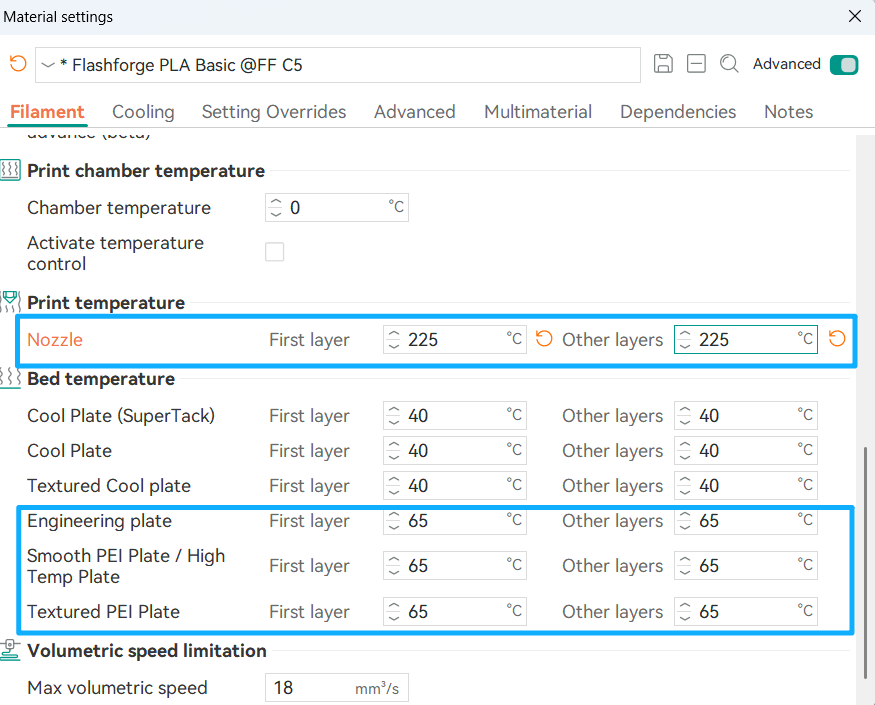
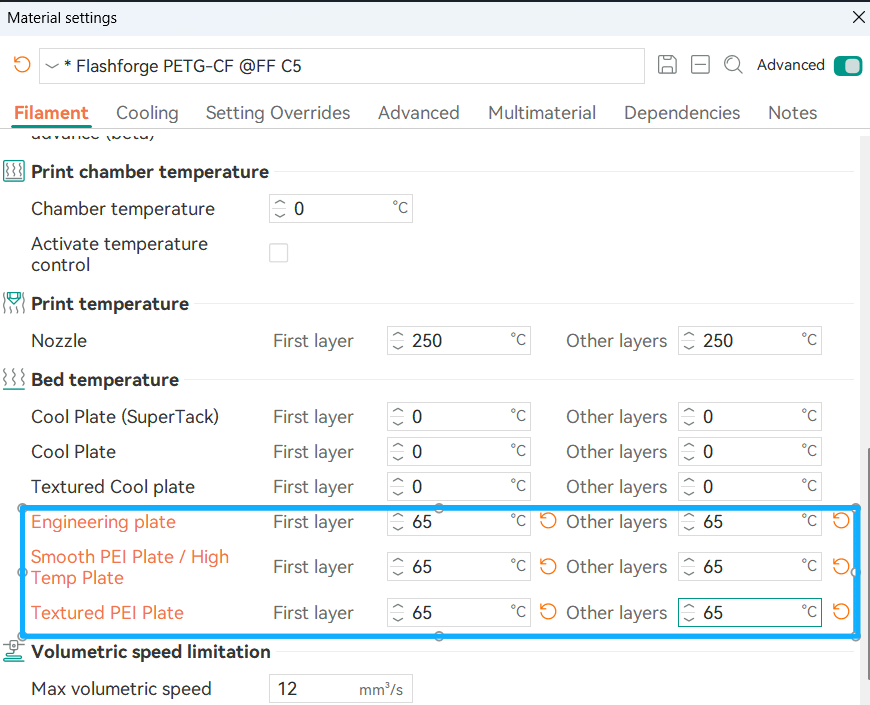
Due to the different heat distortion temperatures of PLA and PETG, different requirements are placed on the material and temperature of the build platform. To reduce the risk of nozzle clogging and warping, it is recommended to set the platform temperature to 60°C - 65°C. For enclosed models such as the Creator 5Pro, since heat accumulates inside the chamber, it is recommended to open the top cover and front door of the device and activate the automatic exhaust system to adjust the chamber temperature according to the actual ambient temperature. For open models such as the Creator 5, the platform temperature can be appropriately increased as needed to achieve better first layer adhesion.
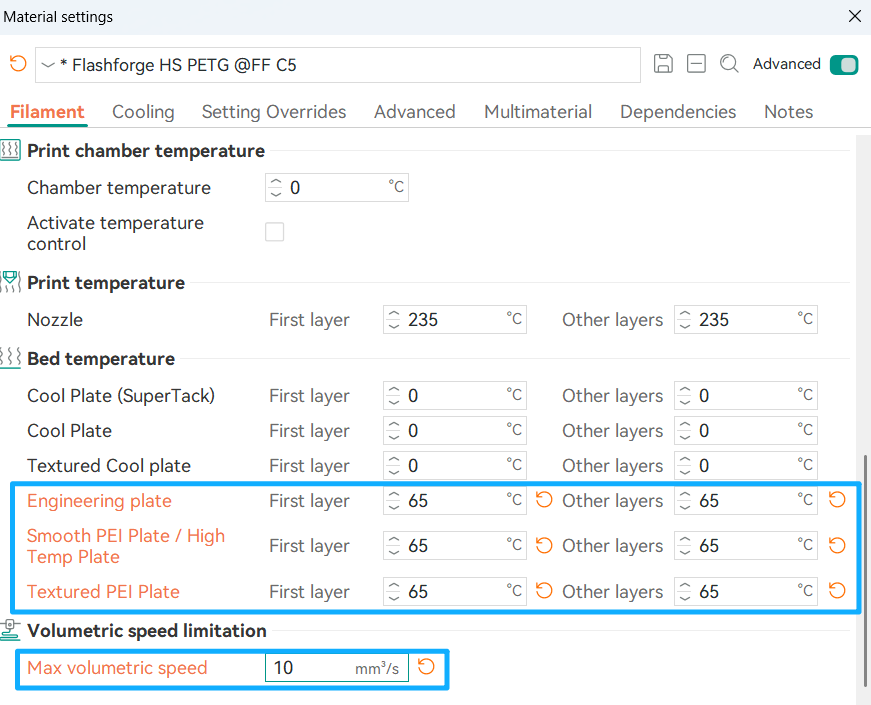
When PLA is used as the main material of the model, the nozzle temperature can be appropriately increased to 225°C - 230°C to enhance the necessary adhesion with PETG and reduce the risk of the main material slipping off the support material PETG. Appropriately increasing the temperature of PETG helps with better adhesion. Additionally, it is recommended to choose HS PETG, which has a temperature closer to that of PLA, as the support material when selecting PETG-type materials.
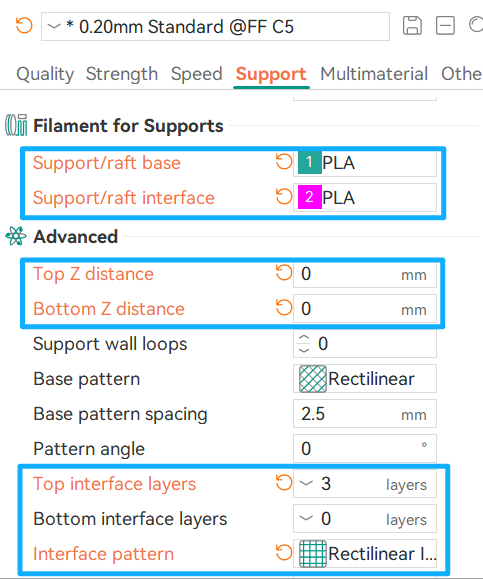
In addition to platform and material extrusion temperature, modifying support parameters will achieve better support surface results. Here, PLA is used as the model body and PETG as the support material for example:
3、Other suggestions
Since the mutual adhesion between support material and model material is not as good as that of using the same material, and using a single support material as the support body and contact surface will increase the number of head changes, it is generally recommended that only the raft layer/support interface layer use different materials for support.
¶ Hybrid Printing of Soft and Hard Materials(Experimental Feature)
1、Filament Preparation
Since soft materials usually absorb water easily, necessary drying and moisture-proof treatments are required. Using a material box with a drying function can maintain the dryness of the material during the printing process to the greatest extent.
2、Printer Preparation
For enclosed models such as Creator 5 pro, the top sealing cover needs to be removed and the front door opened to reduce heat accumulation caused by platform thermal radiation. Soft materials have a higher coefficient of friction and deformation risk with the extrusion channel, so please minimize the resistance in the entire feeding chain, including but not limited to using a material barrel instead of a hanger, using a shorter Teflon tube or inserting the material directly from the nozzle, and using a larger-diameter nozzle. Please apply special glue on the print bed to prevent the soft material from sticking too firmly to the print bed.
3、Print Parameter Settings
Please turn off all cavity heating options and uniformly adjust the preset platform temperature of the materials involved in printing to below 70°C.
4、Use beam interlocking
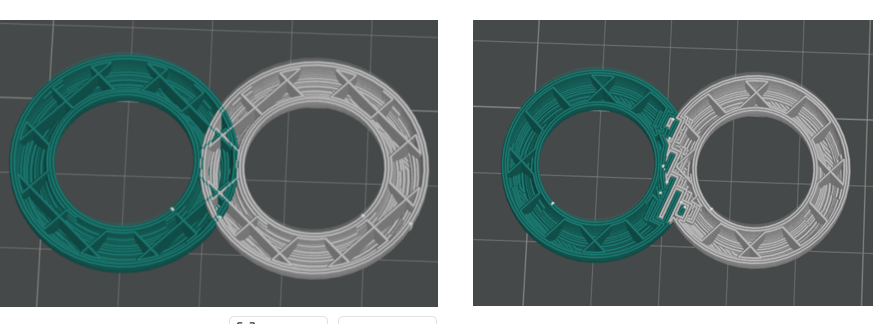
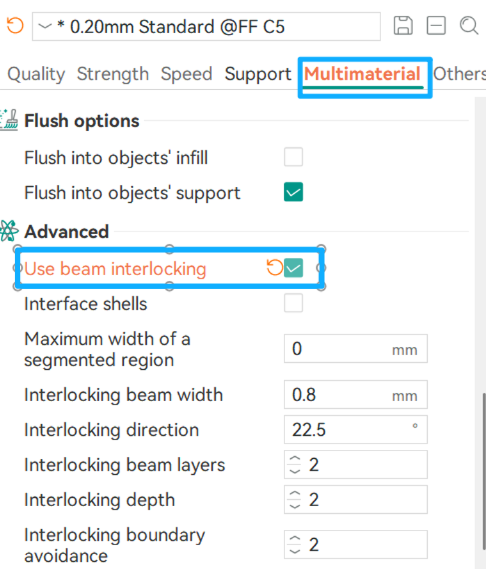
To improve the adhesion between different materials, the interlocking beam function can be enabled. When using it, please ensure that the model features corresponding to the two materials used for interlocking belong to one model (or assembly), rather than two independent entities.
As shown in the left figure below, independent individuals will not be able to produce an interlocking effect, and other errors will occur;After correctly handling the model and enabling the interlocking beam function, the connection style shown in the right figure will be presented.
Open Path:Process--Multiaterial--Advanced--Use beam interlocking
¶ Special Support Material Printing
1、Filament Preparation
Support materials usually absorb water easily, so they must be pre-dried and kept dry throughout the printing process. It is recommended to use a drying hopper for printing to maintain optimal results.
2、Printer Preparation
When using support materials such as PVA, as the height of the model and the printing time increase, the exposure time of the support material in the environment also becomes longer, increasing the risk of printing failure caused by water absorption and softening. Please try to keep the humidity of the printing material and the chamber at a low level. It is not recommended to print high soluble support material structures with open-type printers; instead, choose easily peelable support materials.
3、Print Parameter Settings
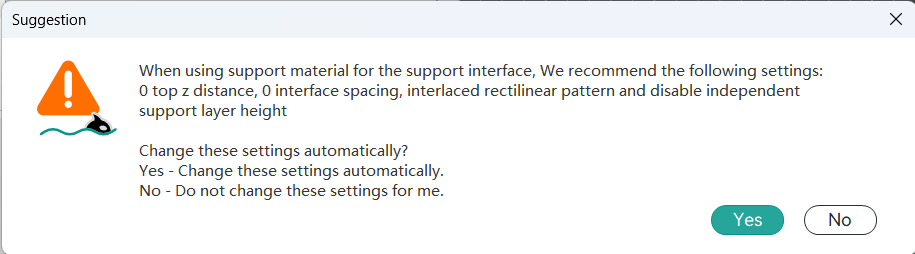
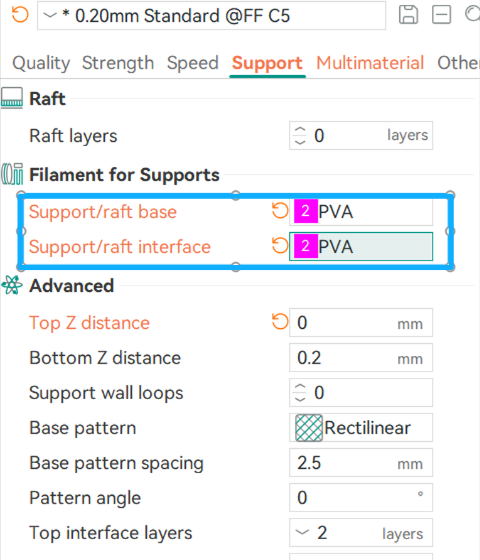
When selecting the corresponding support material in the support interface, the slicing software will automatically enable the exclusive modification of the support material, and custom adjustments can also be made.
3、Attention
PVA or BVOH materials typically have poor interlayer adhesion, so it is recommended to print at a relatively low speed. For the support style, it is recommended to use the normal style rather than the tree style. It is recommended to use the same support material for the support body and the interface layer. Since the adhesion between the support material and the model body material is poor, if it is only used as the interface layer, the model may easily slip off.
¶ Mixed printing of other Filaments
1、Filament Classification
High-temperature Filaments
To ensure the necessary interlayer bonding strength, reduce internal stress, etc., such consumables need to be printed at the highest possible chamber temperature. Common high-temperature consumables include:ABS、ASA、PPS、PPS-CF、PPA-CF、PPA-GF、ABS-GF、ASA-CF、PC、PA、PA-CF、PET-CF
Medium Temperature Filaments
This type of consumable combines excellent temperature resistance characteristics, enabling high-quality printing results without the need to turn on the chamber heating. Common medium-temperature consumables include:HIPS、PE-CF、PP-CF、PP-GF、PHA、PE、PP、EVA
Low-temperature Filaments
Due to its low heat distortion temperature, when the chamber temperature exceeds 45°C, it may cause the consumables to soften and deform inside the extruder or hot end, thereby increasing the risk of blockage. Therefore, such consumables are strictly prohibited from being used in high-temperature chamber environments.
Common low-temperature filaments include: PLA、PETG、PETG-CF、TPU、PLA-CF、PLA-Aero、PVA、BVOH
2、Attention
Try to choose materials with similar cavity temperature requirements for mixed printing. If different temperature materials need to be mixed, please strictly follow the recommended settings for printing. For example, when mixing TPU with other materials, refer to the precautions for mixing soft and hard materials.