¶ Q1: What filaments can the Creator 5 print? Which ones are recommended for high-quality results?
A: The Creator 5 supports a wide range of filaments: PLA, PETG, TPU 90A-95A, TPU 64D, SILK; PLA-CF, PETG-CF, PVA, BVOH; ABS, ASA, PA-CF, PET-CF, PAHT-CF, ASA-CF(GF), ABS-CF(GF), PPA-CF(GF), PPS-CF, S-Multi, S-PATH
Recommended: PLA, PETG, TPU 90A-95A, PLA-CF, PETG-CF, SILK, PVA, BVOH, S-Multi, S-PATH
Capable: ABS, ASA, PA-CF, PET-CF, PAHT-CF, ASA-CF(GF), ABS-CF(GF), PPA-CF(GF), PPS-CF
As this is an open-frame printer, filaments listed as "Capable" can be printed but may not deliver full performance. For optimal results, we recommend using the Creator 5 Pro.
¶ Q2: Does the Creator 5 support automatic filament loading into the extruder?
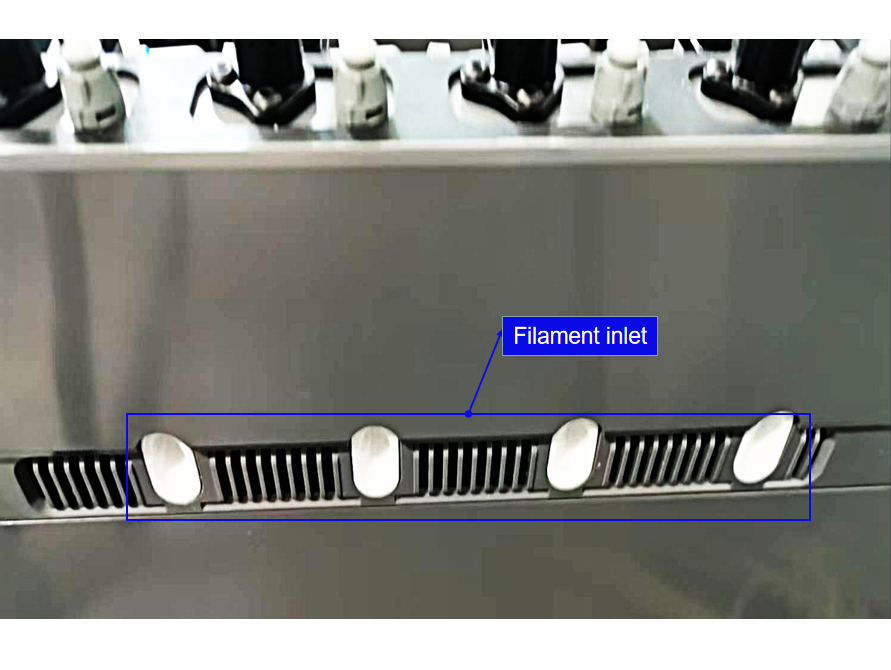
A: The Creator 5 uses a direct-drive extrusion system and does not have an automatic loading mechanism. Filament needs to be fed manually through the filament inlet (shown below) and guided through the tube into the extruder.
¶ Q3: How to unload filament on the Creator 5?
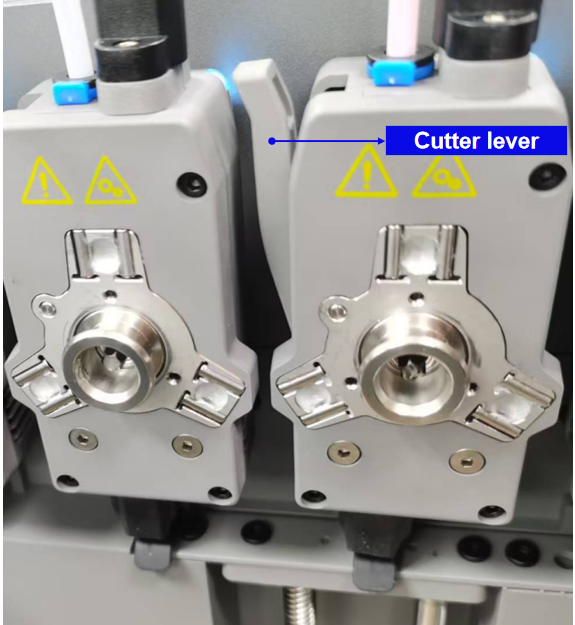
A: The extruder assembly includes a cutter. Press the extruder assembly as indicated by the arrows to cut the filament, and then manually pull the filament out from the insertion end.
¶ Q4: Is leveling required after replacing the nozzle?
A: Yes. We recommend running auto leveling after any nozzle change to compensate for tiny installation variances and ensure optimal print quality.
¶ Q5: Can filaments from other brands be used?
A: Yes. You can use filaments from other brands, but certain parameter adjustments are required due to slight temperature differences in different filaments.
¶ Q6: What to do if your print warps or won't stick?
A: Solution 1: Increase the bed temperature to improve adhesion between the bed and your print.
Solution 2: Add a brim when slicing your model.
Solution 3: Apply glue.
Solution 4: Clean the bed to remove any grease or residue.
Solution 5: Check if the bed is level. The leveling function can be used.
¶ Q7: What to do if the screen shows only folders and no print files after inserting the USB flash drive?
A: The USB flash drive is not formatted correctly. The device supports the FAT32 file system. Please reformat your USB flash drive to FAT32.
¶ Q8: What to do if the Wi-Fi fails to connect?
A:
1.Please check if the Wi-Fi name contains special characters. If so, modify it and try again.
2.Please check if the password contains special characters. If so, modify it and try again.
¶ Q9: Any precautions for firmware updates?
A: Do not power off the printer or disconnect from the network during firmware download or update, as this may cause the update to fail.
¶ Q10: Why does the screen stay white on startup?
**A: **If the startup sound is audible, try replacing the screen or the cable. If the issue persists, please contact Customer Support.
¶ Q11: Does TPU need to be dried before printing? What humidity level is recommended during printing?
A: Yes. TPU must be dried. Moisture absorption may cause print failure. Printing in a dry box is recommended.
Dry box humidity should be kept below 15%. Replace desiccant promptly if humidity exceeds 15%.
¶ Q12: How to remove the nozzle assembly?
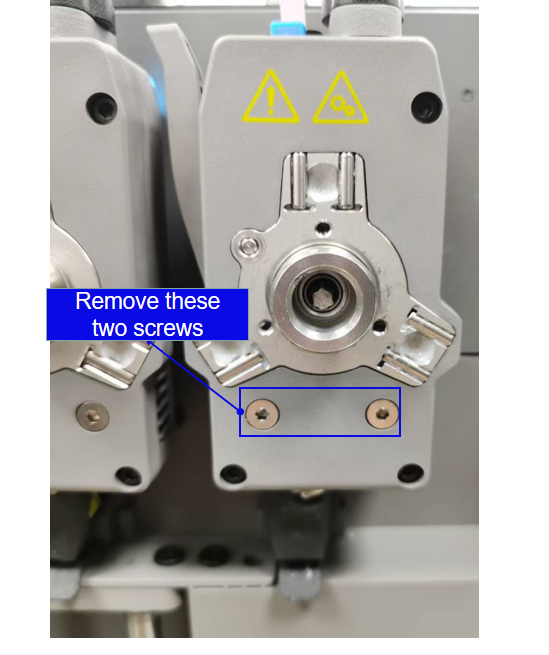
A: Step 1: Remove the two silver screws as shown in the image;
Step 2: Detach the extruder assembly from the dock;
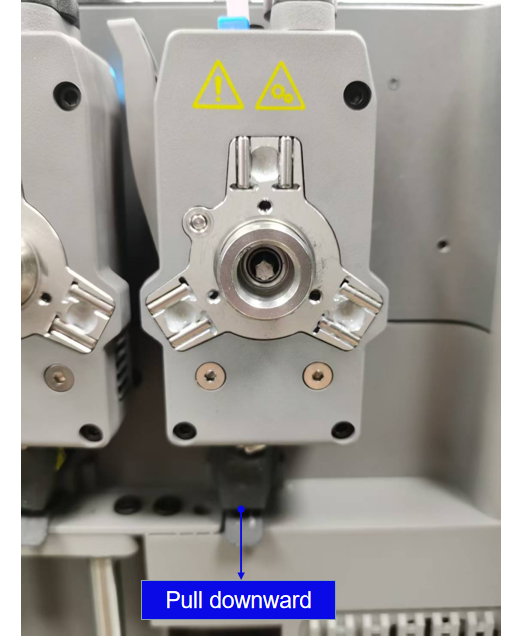
Step 3: Pinch the silicone sock and pull the nozzle assembly downward as shown(The extruder needs to be removed from the extruder dock).
¶ Q13: Can the Creator 5 be upgraded to the Creator 5 Pro?
A: No. The Creator 5 cannot be upgraded to the Creator 5 Pro. The Creator 5 Pro features structural differences such as an active chamber heating module and an adaptive air circulation system.
¶ Q14: Should leveling or vibration compensation be done first on the Creator 5? Do they affect each other? Are both always required?
A: The order does not affect print results. After completing both during the initial setup, recalibration is generally unnecessary unless print issues occur, the nozzle is replaced, or maintenance is performed.
¶ Q15: When is multi-extruder offset calibration required, and how long does it take?
A: Perform multi-extruder offset calibration in the following situations: 1. First-time printer setup; 2. After replacing a hotend; 3. If the nozzle collides with the bed or a model; 4. If misalignment is observed during multi-color/multi-filament printing. The calibration process takes approximately 15-20 minutes.
¶ Q16: What are the facility requirements for the Creator 5?
A: The Creator 5 is a robust printer suitable for offices, homes, and workshops. It requires no additional ventilation and no special wall outlets.
¶ Q17: How loud is the Creator 5 during operation?
A: In Silent Mode, operating noise can be kept below 55dB.
¶ Q18: What is the resolution and frame rate of the Creator 5's camera?
A: The camera captures at 1920*1080 (HD) at 30fps.
¶ Q19: Are accessories interchangeable between the Creator 5 and Creator 5 Pro?
A: Yes. Accessories are compatible.
¶ Q20: How much clearance space is required around the Creator 5?
A: At least 10mm on the left and rear, 200mm on the right, and 500mm at the front.
¶ Q21: Can the Creator 5 support multi-color printing without a prime tower?
A: Disabling the prime tower is not recommended. While the Creator 5 eliminates "purging" during filament switches, minor filament oozing may still occur. The prime tower cleans the nozzle before each filament switch and at the start of printing, ensuring the nozzle remains clean.
¶ Q22: What smart detection features does the Creator 5 support?
A: The Creator 5 includes multiple built-in sensors for filament run-out detection, filament tangle detection, door-open detection, and chamber temperature detection, ensuring safe and stable printing. It also supports AI detection, including spaghetti detection and foreign object detection.
¶ Q23: What routine maintenance does the Creator 5 require?
A: The Creator 5 requires minimal maintenance. Detailed maintenance guides can be found on our official Wiki.
¶ Q24: Are leveling and vibration compensation required before every print?
A: Calibration is not required before each print unless you have replaced the nozzle or moved the printer.
¶ Q25: How often should leveling be performed?
A: Under normal use, frequent leveling is unnecessary. Perform leveling if you notice poor first-layer quality, incorrect nozzle-to-bed distance, or after disassembling/reassembling the nozzle.
¶ Q26: How often should vibration compensation be performed?
A: Perform vibration compensation once when you first start using the printer. Under normal use, no further calibration is required. Recalibrate only if noticeable ringing appears on prints, or if the timing belts become loose.
¶ Q27: What are the input/output voltages for the Creator 5? Does it support 110-220V?
A: Power specifications vary by region. Different versions are provided for different countries.
¶ Q28: Does the Creator 5 support 5G Wi-Fi?
A: It supports dual-band 2.4G/5G Wi-Fi.
¶ Q29: Can print files be sent remotely to the Creator 5 without an internet connection?
A: Yes. This is supported in Local Area Network (LAN) mode. However, app connectivity is not available in LAN mode.
¶ Q30: Will a network interruption affect an ongoing print?
A: No. Printing continues uninterrupted.
¶ Q31: How can the live camera feed of the Creator 5 be viewed remotely?
A: You can access the live view in the following ways:
Via Flash Maker after binding your account;
Via Orca-Flashforge after connecting.
¶ Q32: Does the Creator 5 still support the FlashCloud or Polar Cloud?
A: The FlashCloud has been discontinued. It now adopts a new cloud service with app-based account binding. Polar Cloud is no longer supported due to its slow speed and low user base.
¶ Q33: What are the estimated times for various operations, like extruder/nozzle change?
A:
| Item | Parameter |
|---|---|
| Nozzle heating (25°C to 200°C) | ≈20s |
| Nozzle heating (25°C to 300°C) | ≈45s |
| Bed heating (25°C to 100°C) | ≈250 s |
| Actual surface temp when bed is set to 120°C | ≈100°C |
| Creator 5 Pro chamber heating (25°C to 50°C) | ≈10min |
| Creator 5 Pro chamber heating (25°C to 65°C) | ≈50min |
| Conditions for noise below 45dB (Creator 5 Series) | / |
| Noise level in standby mode (Creator 5 Series) | 55-65db |
| Max bed load capacity | 10 kg |
| Extrusion force | >55 N |
| Max flow rate | 32 mm³/s |
| Feed roller hardness | 38-43HRC |
| Power consumption in standby mode | ≈0.014kw |
| Motor microstepping | 1/16 |
| Clearance requirements | Right side: 200 mm,Front: 500 mm |